DiskCleaner icon

Keep at least 10 GB free.
Automatically.
自动保持至少 10 GB 可用空间

A native macOS storage cleaner with a GUI. See exactly where your disk space went, check what every app is using, and let it quietly clean rebuildable caches and logs — stopping the moment your target is met.

原生 macOS 储存空间清理工具,带图形界面。看清空间到底去哪了、每个应用占用了多少, 然后让它在后台安静地清理可重建的缓存与日志 —— 达到目标就立刻停止。

macOS 14+ macOS 14+ SwiftUI + shell · no dependencies SwiftUI + shell · 零依赖 MIT latest最新版 …
Apple Silicon arm64 · .zip Intel x86_64 · .zip All downloads 全部下载 releases + SHA-256 发布页 + SHA-256 校验

Not sure which you have? Run uname -m — arm64 is Apple Silicon, x86_64 is Intel. 不确定是哪种?终端执行 uname -m —— arm64 是 Apple 芯片,x86_64 是 Intel。
Screenshots

界面预览

Everything in one window — and a per-app data manager when you want to dig in.

所有信息都在一个窗口里,想深挖时还有按应用的数据管理器。

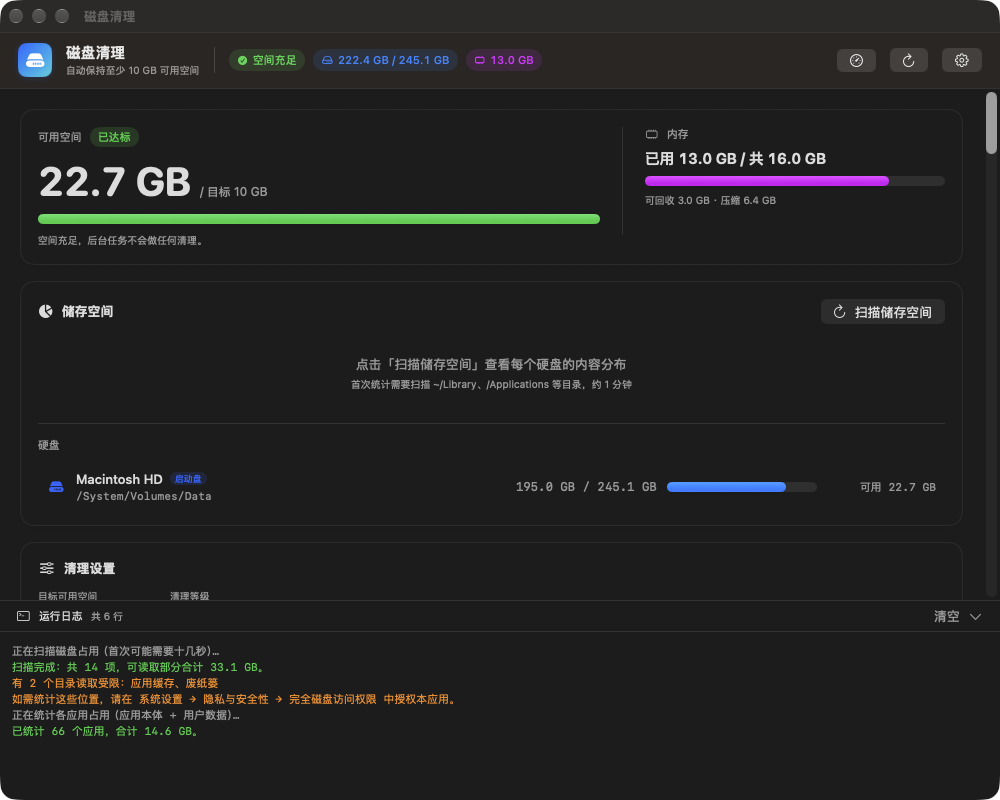
DiskCleaner main window
Free space, disk & memory, macOS-style storage breakdown
可用空间、硬盘与内存、macOS 风格储存空间分类
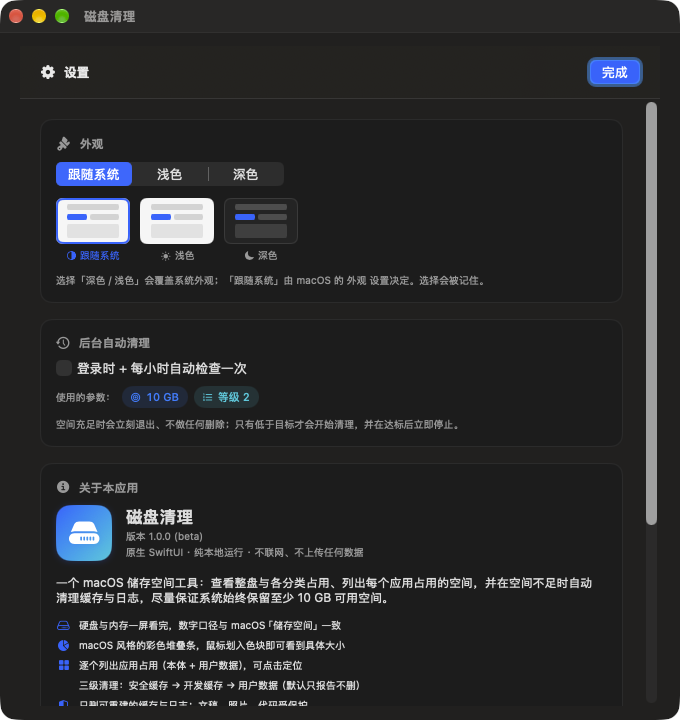
DiskCleaner settings
Settings — theme, menu bar, update check
设置 —— 主题、菜单栏、更新检查

Features

功能

Built to run unattended, so deletion is deliberately boring.

为无人值守而设计,所以删除逻辑刻意做得"无聊"。

🛟

Never run out of space

不再爆盘

Checks hourly and cleans only when free space drops below your target (10 GB by default) — then stops the instant it is met.

每小时检查一次,只有低于目标(默认 10 GB)才清理,达到目标立刻停止,绝不"过度清理"。

🍩

macOS-style storage view

macOS 风格储存空间

A colour stacked bar for Applications, Documents, Photos, Developer caches, System data… Hover a segment for the exact size.

彩色堆叠条展示应用程序、文稿、照片、开发者缓存、系统数据等分类;鼠标划入色块看精确大小。

📦

Per-app usage

每个应用的占用

Every app's bundle size plus its user data under ~/Library, sorted by size.

每个 App 的本体大小,加上它在 ~/Library 下的用户数据,按大小排序。

🧹

Per-app data manager

应用数据管理

Pick exactly what to delete. Caches and logs are preselected; chat records, databases and login state stay locked until you explicitly unlock them.

自己挑要删什么。缓存和日志默认勾选;聊天记录、数据库、登录状态**默认锁住**,必须手动解锁并二次确认。

🧭

Menu bar extra

菜单栏小图标

Free space next to the icon, a warning triangle when you drop below target, and a popover with disk, memory and quick actions.

图标旁显示可用空间,低于目标变 ⚠️,点击弹出磁盘、内存面板与快捷操作。

🔒

Private by design

纯本地

No telemetry, nothing uploaded. The only network request is the optional update check — turn it off and the app never opens a socket.

没有遥测、不上传任何数据。唯一的联网行为是可关闭的更新检查 —— 关掉后应用完全不碰网络。

How cleaning works

清理逻辑

Three tiers, from safest to most aggressive. Tier 3 never runs unless you ask for it.

三个等级,从最安全到最激进。第 3 级不主动开启就永远不会执行。

Tier等级 What it removes清理内容 Default默认
1 Caches & logs, Xcode DerivedData, crash reports, huge log files (truncated, not deleted) 缓存与日志、Xcode DerivedData、崩溃报告、超大日志(清空而非删除) ✅
2 npm / pnpm / pip / Homebrew / Go / Cargo / Gradle and other rebuildable developer caches npm / pnpm / pip / Homebrew / Go / Cargo / Gradle 等可重建的开发缓存 ✅
3 Xcode archives, iOS backups, Trash, old downloads — your personal data Xcode 归档、iOS 备份、废纸篓、旧下载 —— 你的个人数据 report only 只报告
Safety: every target is on a whitelist and must live inside your home folder; ~/Documents, ~/Desktop, ~/.ssh, ~/Library/Keychains … are refused outright. Deletion is age-based, filenames are handled NUL-safely, every du has a hard timeout, and the whole run is logged to ~/Library/Logs/diskautoclean.log. 安全:所有清理目标都在白名单里且必须位于你的主目录内;~/Documents、~/Desktop、~/.ssh、~/Library/Keychains 等路径直接拒绝。按时间删除、文件名 NUL 安全处理、每个 du 都有硬超时,全过程记录到 ~/Library/Logs/diskautoclean.log。

Install

安装

  1. Check your chip确认芯片
    Run uname -m → arm64 (Apple Silicon) or x86_64 (Intel). 执行 uname -m → arm64(Apple 芯片)或 x86_64(Intel)。
  2. Download & unzip下载并解压
    Grab the matching .zip above, then drag DiskCleaner.app into /Applications. 下载上面匹配的 .zip,把 DiskCleaner.app 拖进 /Applications。
  3. First launch首次打开
    The build is ad-hoc signed (not notarized), so macOS will warn you. Right-click → Open, then Open again — or run the command below. 发布包是 ad-hoc 签名(未公证),系统会提示。请 右键 → 打开,再点一次「打开」;或执行下面的命令。
xattr -dr com.apple.quarantine /Applications/DiskCleaner.app
open /Applications/DiskCleaner.app

Prefer to build it yourself? Only the Command Line Tools are needed.

想自己编译?只需要 Command Line Tools。

git clone https://github.com/wang90/disk-cleaner.git
cd disk-cleaner
./build.command          # builds DiskCleaner.app and opens it